
As a special educator, your day is a fast-paced balancing act.
Between managing student behavior, delivering individualized instruction, progress monitoring, analyzing student data, and writing IEP goals, it’s busy.
We understand you need your technology to support an intuitive, smart workflow. That is why for the 2026-2027 school year, TeachTown is rolling out our Unified Navigation Experience!
We are bringing our entire solution suite together under one digital ‘home base’ designed to simplify your daily routine. The unified ecosystem lightens the cognitive load and lets you focus more of your mental energy on the students right in front of you.
The Unified Navigation Experience is live! Here is an inside look at how the Unified Navigation Experience will transform your classroom operations this school year:
Previously, hopping between different TeachTown programs required a process of logging out of one application to log into another. With the new Unified Navigation Experience, everything is in one place.
A persistent, consistent left-hand navigation bar stays with you across all views. Now, you can seamlessly switch between core curricula, administrative management, student tracking, and reporting functionality without ever having to log out. Want to pivot from a core enCORE academic block to a targeted Social Skills lesson? It’s now just one quick click away.
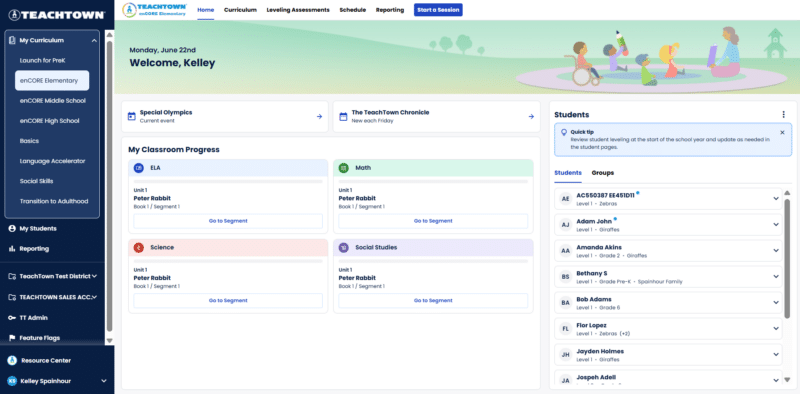
Finding exactly what you need is now faster than ever. The reimagined TeachTown home screen cleanly organizes our entire solution suite into distinct, easy-to-find sections:

In addition to unifying the web experience, we have also revolutionized our mobile and tablet experience. Individual iPad apps for each separate curriculum have been replaced by a single Progressive Web App (PWA).

What does this mean for you and your school’s IT department?
To enjoy the best experience on your iPad, please transition to our Progressive Web App (PWA) today! We’re sunsetting our legacy iPad apps, which means technical support and functionality for those apps will decrease over time.
As part of this massive navigation glow up, managing student profiles and tracking daily progress has gotten a major face-lift, too!

A reliable, centralized foundation means an easier school year for teachers, administrators, and students alike. By bringing the whole TeachTown ecosystem together, we are proud to deliver a predictable, cohesive, and modernized workspace that respects your time and elevates your teaching experience.
Ready to explore the glow-up? It all goes live on July 8. Log into your account this summer to experience the new Unified Navigation Experience firsthand and get your classroom set up for a winning season!